Breakdown
How do we drive music animation?
There are 2 different approaches to driving a music animation:
FFT based approach- where you input an audio file (.wav, .mp3, etc) and have the visual elements react to the audio data. The audio data is filtered with steep inverse notch filters on selected frequencies. With the filtered data, you can then use the amplitude of the signal to drive animation parameters. This feature is built into Blender.
Preactive approach using a MIDI file. A MIDI file is read in and broken down into its components. Animation curves get “copied” throughout the duration of the MIDI file, based on sets of parameters, typically determined by the notes in the MIDI file. The MIDI file determines when animations are being copied. This is the way MIDIAnimator works.
Process of creating a MIDI animation with MIDIAnimator (front/backend):
MIDI files are broken down using the MIDIFile() class. MIDIFile() takes 1 parameter, which is the file where the MIDI file is stored.
MIDIFile() will create MIDITrack(), MIDINote() and MIDIEvent() objects based on the data inside of the MIDI file.
Structure of a MIDIFile() object:
MIDIFile:
	file: string (where the MIDI file is stored)
	tracks: list of MIDITrack objects

	MIDITrack:
		name: string
		notes: list of MIDINote objects
		control change: associative array that maps a control change number to a list of MIDIEvent values
		aftertouch: list of MIDIEvent values
		pitchwheel: list of MIDIEvent values

		MIDINote:
			channel: integer
			noteNumber: integer
			velocity: integer
			timeOn: float, in seconds
			timeOff: float, in seconds

		MIDIEvent:
			channel: integer
			value: float
			time: float, in seconds
To get specific MIDITrack objects, use the MIDIFile.findTrack() method.
To start adding instruments, instance a MIDIAnimatorNode() object
Use the
MIDIAnimatorNode.addInsturment()method to add an instrument.Takes a
MIDITrack,bpy.types.Collection.
Call the MIDIAnimatorNode.animate() method to animate all instruments.
Given each instrument in the
MIDIAnimatorNode()instruments list:preAnimate()is calledpassby default.
instrument.animate()gets called for every note in the MIDIFileTakes note and caclulates its keyframe data for it (applies time mappers, velocity, etc.)
Adds together in the list of already created keyframes
Dealing with overlapping animation:
In Figure A, we are given a simple dampened oscillation function.
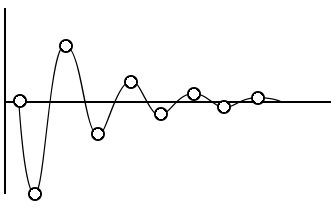
Figure A, simple dampened oscillation
If we were to animate Figure A using a simple MIDI file (2 notes, with the notes overlapping), it would look something like Figure B.
However, there is a fundamental problem, as there is overlapping animation (denoted by the question mark in Figure B).
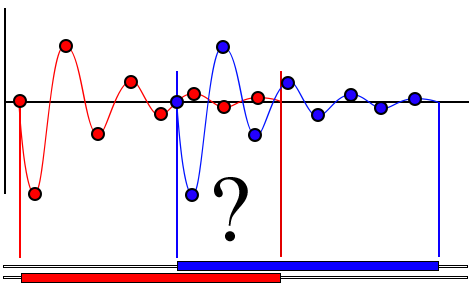
Figure B, animation duplicated across timeline
To deal with the overlapping animation, we can simply add the 2 animation curves together, shown in Figure C.
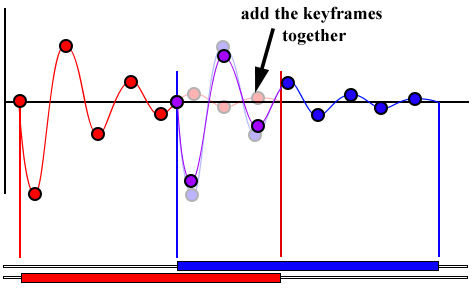
Figure C, resulting animation curve
Problems with this approach:
If the motion is not oscillating, the motion will be added together, in a result which is not desirable. More techniques in dealing with overlapping animation will need to be researched.